US100 PRO v1.18 is a configurable MetaTrader 5 Expert Advisor for automated US100 trade management.
Run M5, M15 or H1 individually or on separate charts. Choose the risk settings, filters and trading hours that suit your approach — with automation executing the configured rules on MT5.
Automated entries and configurable trade management
Independent risk settings for M5, M15 and H1
Trend filters, runner stops and weekend protection
Both buttons open the MQL5 Market listing. Confirm the current rental duration, price and terms there before checkout.
US100 PRO
TRADEVECTORLABS PRO · V1.18
WHY US100 PRO?
Less manual setup. More structured control.
The EA can automate its configured trading rules on a compatible MT5 terminal. You remain responsible for selecting settings, monitoring execution and managing account risk.
↗Automated trade management
Run a rule-based US100 strategy with configurable entry direction, exit behavior and trade frequency.
◈Risk settings built in
Set position risk and daily loss budgets separately for M5, M15 and H1, with optional filters and entry restrictions.
◷Plan for interruptions
Use scheduled-news restrictions and weekend protection settings to reduce unwanted new entries near specified events.
✓ Configurable controls✓ Three timeframes✓ MT5 Expert Advisor✓ Available on MQL5 Market
CHOOSE HOW TO GET STARTED
One robot. Two ways to access it.
Explore the product on MQL5 Market and choose the option that suits you. Both options lead to the same official product listing.
Purchase US100 PRO
Open the official MQL5 listing to review the purchase details and complete checkout there.
Prices shown are from the product information provided. Verify the current price, rental duration, platform requirements and checkout terms on MQL5. This is not a subscription sold by this website.
BUILT FOR FLEXIBILITY
One EA. Three timeframes.
Choose the chart and risk profile that fits your workflow. Each timeframe can have its own position settings, entry limits and exit behavior.
01 / M5Five-minute trading
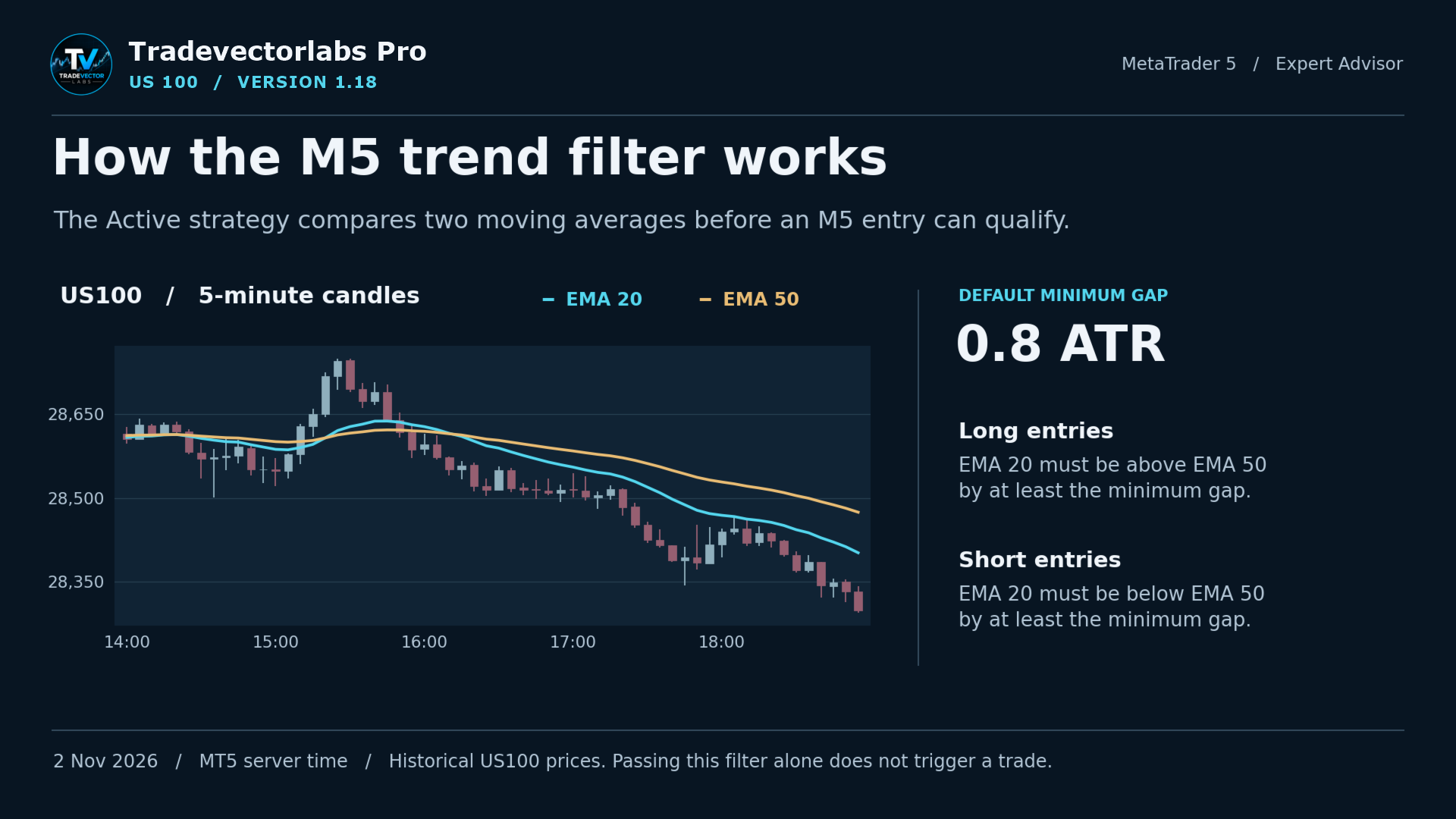
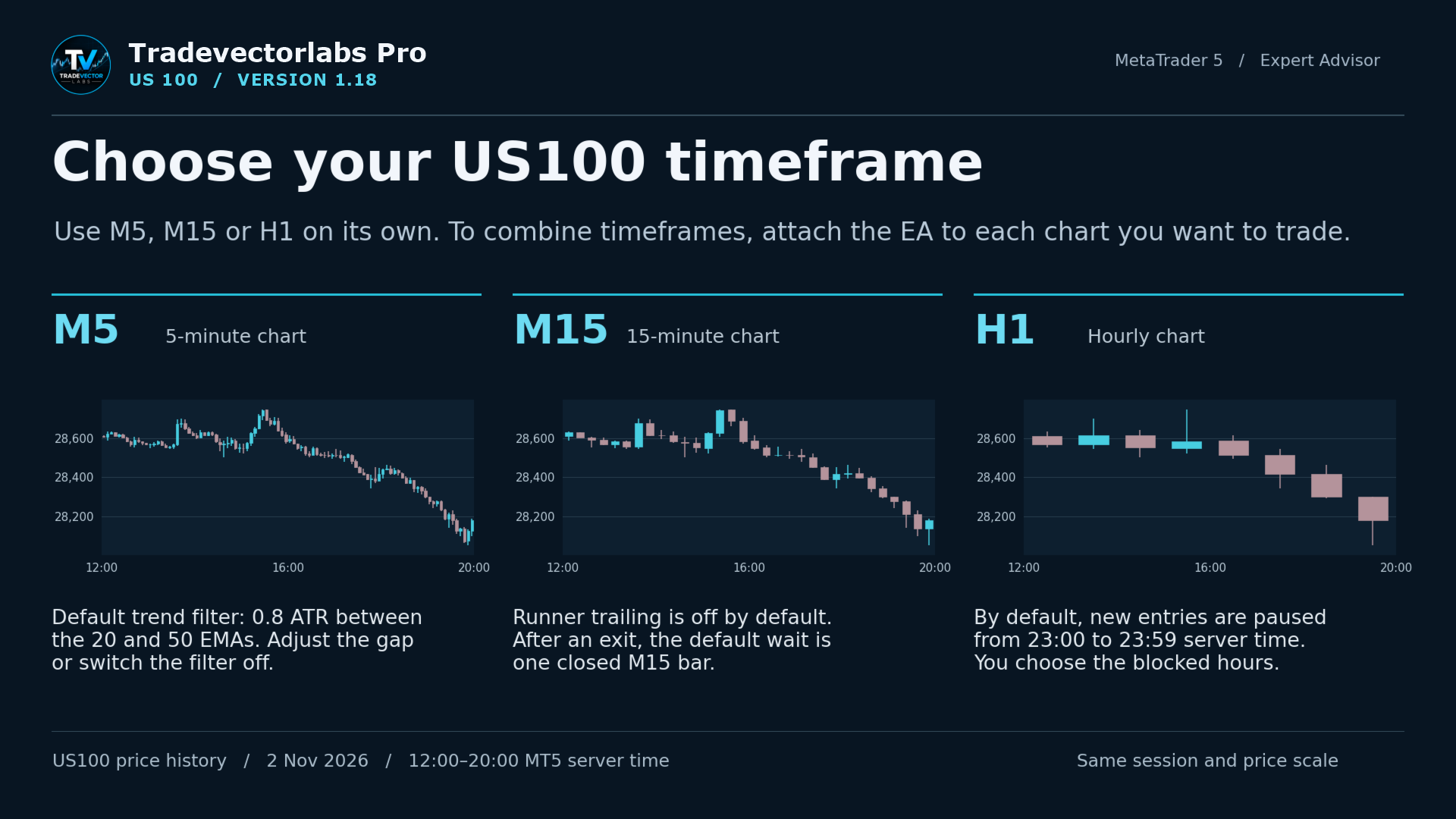
Optional EMA 20/50 trend filter with a default minimum gap of 0.8 ATR. Adjust the gap or disable the filter. An additional setting can reduce morning-session position risk.
02 / M15Fifteen-minute trading
Wait one completed M15 bar after an exit by default. Runner trailing is off by default; you can enable it and optionally require H1 trend confirmation.
03 / H1Hourly trading
Runner trailing is on by default. New entries are blocked from 23:00 to 23:59 broker server time by default; the hours and trailing distance are adjustable.
CONTROL YOUR EXPOSURE
Risk management by timeframe.
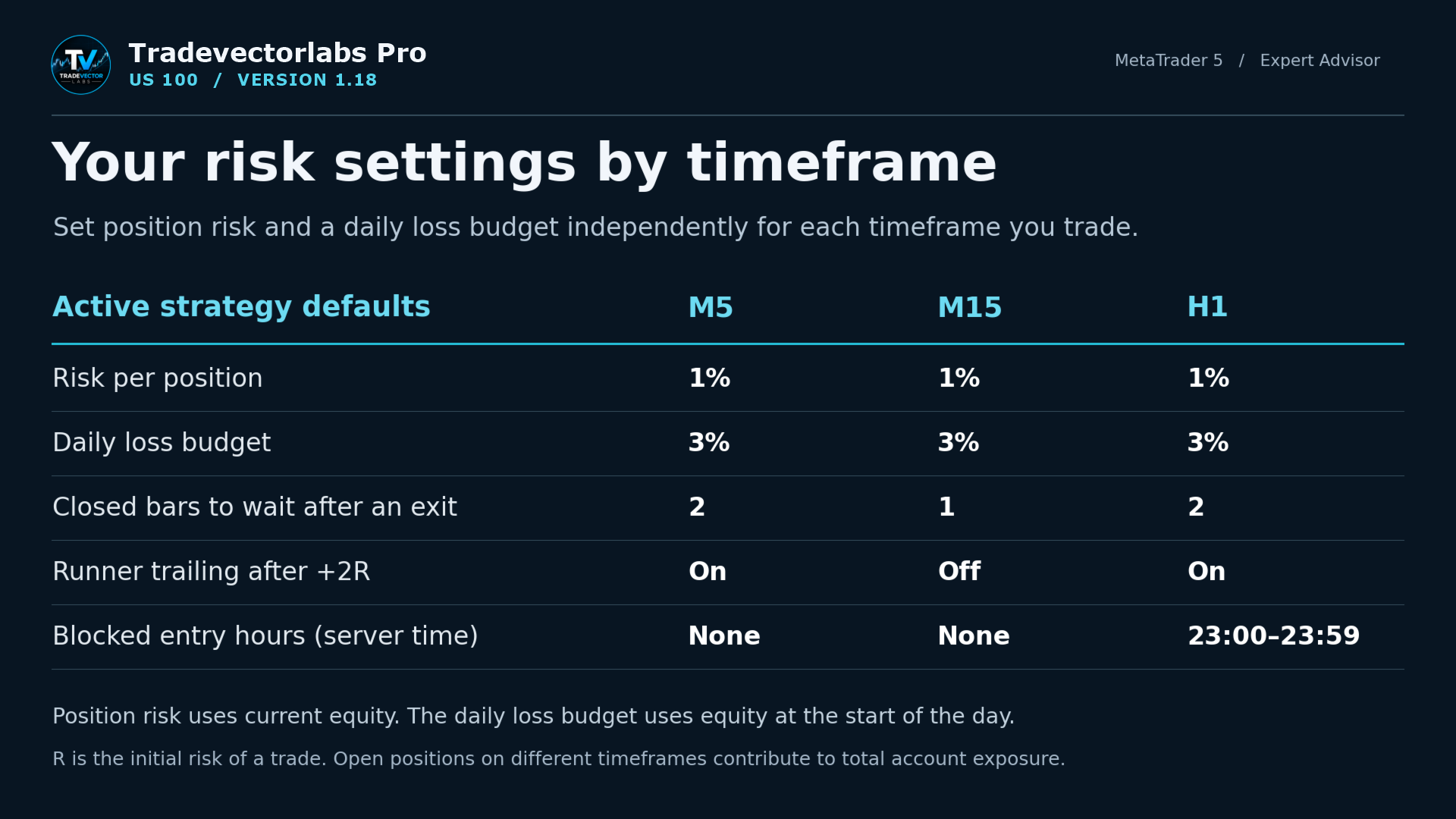
Configure position risk and daily loss limits independently for each timeframe. The defaults below are settings, not performance claims.
1%Default position risk, based on current equity
3%Default daily loss budget, based on start-of-day equity
5%Maximum configurable position risk
Active strategy default
M5
M15
H1
Risk per position
1%
1%
1%
Daily loss budget
3%
3%
3%
Completed bars after an exit
2
1
2
Runner trailing after +2R
On
Off
On
Blocked entry hours (server time)
None
None
23:00–23:59
R is the initial risk of a trade. Concurrent positions on multiple timeframes add to total account exposure. Optional commission and spread settings support position sizing and entry filtering.
MORE THAN ENTRY SIGNALS
Tools for entries, exits and market closures.
01 / ENTRY CONTROLChoose your direction and hours
Allow long, short or both directions. Set daily entry limits, block specific hours and require a configurable number of completed bars after an exit.
02 / RUNNER TRAILOptional trailing after +2R
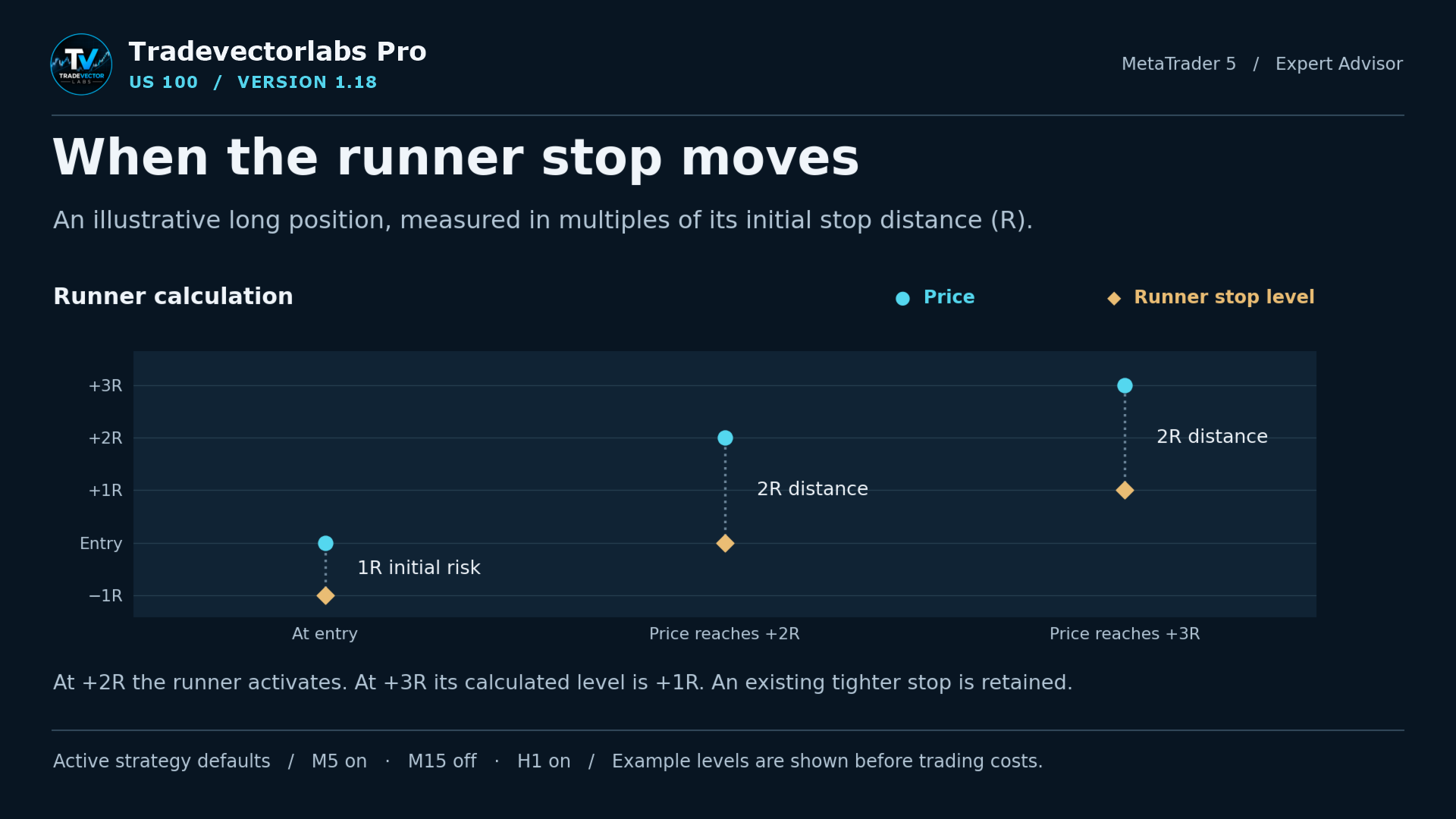
Under the default Active strategy, the optional runner trail activates at +2R and follows at a distance of 2R. A tighter existing stop is retained.
03 / NEWS FILTERPause around USD releases
Use the MT5 economic calendar or enter release times manually to restrict new entries around scheduled USD news.
04 / WEEKEND PROTECTIONPlan for market closures
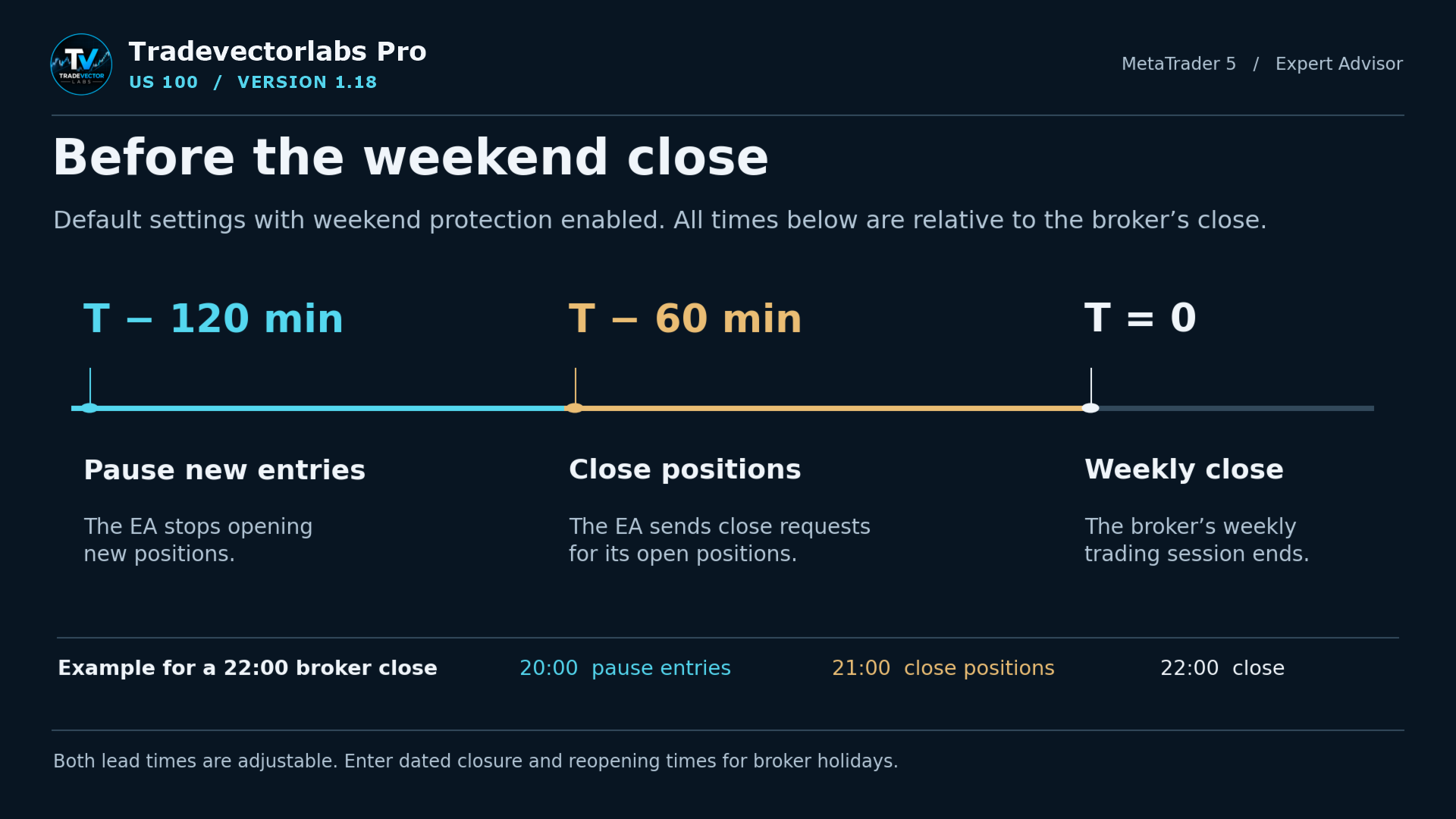
Enabled by default: pause new entries 120 minutes before the broker's weekly close and send close requests 60 minutes before. Both lead times are adjustable, including broker holiday times.
SEE THE SETTINGS
Inside US100 PRO.
See the strategy controls and examples provided for US100 PRO. These images explain settings and mechanics — they are not evidence of profitability.
Tap or click an image to enlarge it.
Choose M5, M15 or H1.Independent risk settings by timeframe.How the M5 EMA trend filter works.When the runner stop moves.Weekend protection timeline.
GETTING STARTED
Set up on MetaTrader 5.
01 Open your broker's US100 chart on a MetaTrader 5 hedging account.
02 Choose M5, M15 or H1 and attach the EA to the chart. Add separate chart instances for additional timeframes.
03 Review risk, trading hours, filters and exit settings before running the EA. MetaTrader VPS is the default live execution option; desktop terminal execution is also available.
04 Check the on-chart status and MT5 logs for startup information and any invalid input settings.
BEFORE YOU BUY
Questions worth answering.
Is this an automated trading robot or a TradingView indicator?+
US100 PRO is an Expert Advisor for MetaTrader 5 that can place and manage trades according to its configured rules. It is separate from TradeVector Labs' TradingView indicators for Bitcoin and gold.
Can I use M5, M15 and H1 together?+
Yes. Attach a separate EA instance to each US100 chart you want to trade. Each timeframe has its own configurable controls, while all positions contribute to your overall account exposure.
What is the difference between buying and renting?+
The product listing offers purchase and rental options. The rental duration, licensing details, final price and payment terms are provided by MQL5 Market. Both buttons on this page open that same listing.
Does the EA guarantee profit or prevent losses?+
No. Automated trading can lose money. Risk limits and protective orders are configurable controls, not guarantees of execution or loss prevention. Test settings and check broker compatibility before live use.
What do I need before installing it?+
A compatible MetaTrader 5 setup, a broker-provided US100 instrument and the account configuration described in the setup section. Review the MQL5 listing for full requirements and product documentation.
For setup questions, contact TradeVector Labs through MQL5 private messages or the product's Comments tab. Email: tradevectorlabs@gmail.com.
Automated trading involves substantial financial risk. No profit, execution or loss-prevention outcome is guaranteed. Review broker compatibility, spreads, leverage, position exposure and your settings before trading. Weekend closing requests may not execute at the requested price or time. This EA is for MetaTrader 5; it is separate from our TradingView indicators.
 US100